
- Solutions
- Know-how
- About us
- CompanyAs an SAP partner and software vendor, we develop digital workplaces and innovative solutions based on the SAP Business Technology Platform that make working with SAP easier and generate enthusiasm among users.
- References
- PartnerAs an SAP partner and software vendor, we develop digital workplaces and innovative solutions based on the SAP Business Technology Platform that make working with SAP easier and generate enthusiasm among users.
- ContactAs an SAP partner and software vendor, we develop digital workplaces and innovative solutions based on the SAP Business Technology Platform that make working with SAP easier and generate enthusiasm among users.
- News & EventsNews at a glance


Stefan Bohlmann


SAP Build Work Zone -
Application Integration
April 16, 2026
Reading time: 10 minutes
Technology & Architecture
This blog article explains the interaction of the most important components and services involved in the SAP Build Work Zone ecosystem. The following diagram provides an overview of the technical architecture and its relationships. SAP Build Work Zone is a service of the SAP Business Technology Platform (BTP) that can be activated in a BTP subaccount. Users can access the service via a web browser by entering the appropriate URL, or through an app on their smartphone. For user authentication and management, SAP Build Work Zone is integrated with the so-called SAP Cloud Identity Services. These are a group of services, also hosted on SAP BTP, that handle all identity and access management tasks. A key responsibility of these services is to implement Single Sign-On for the connected systems while ensuring that system and data access remains secure.
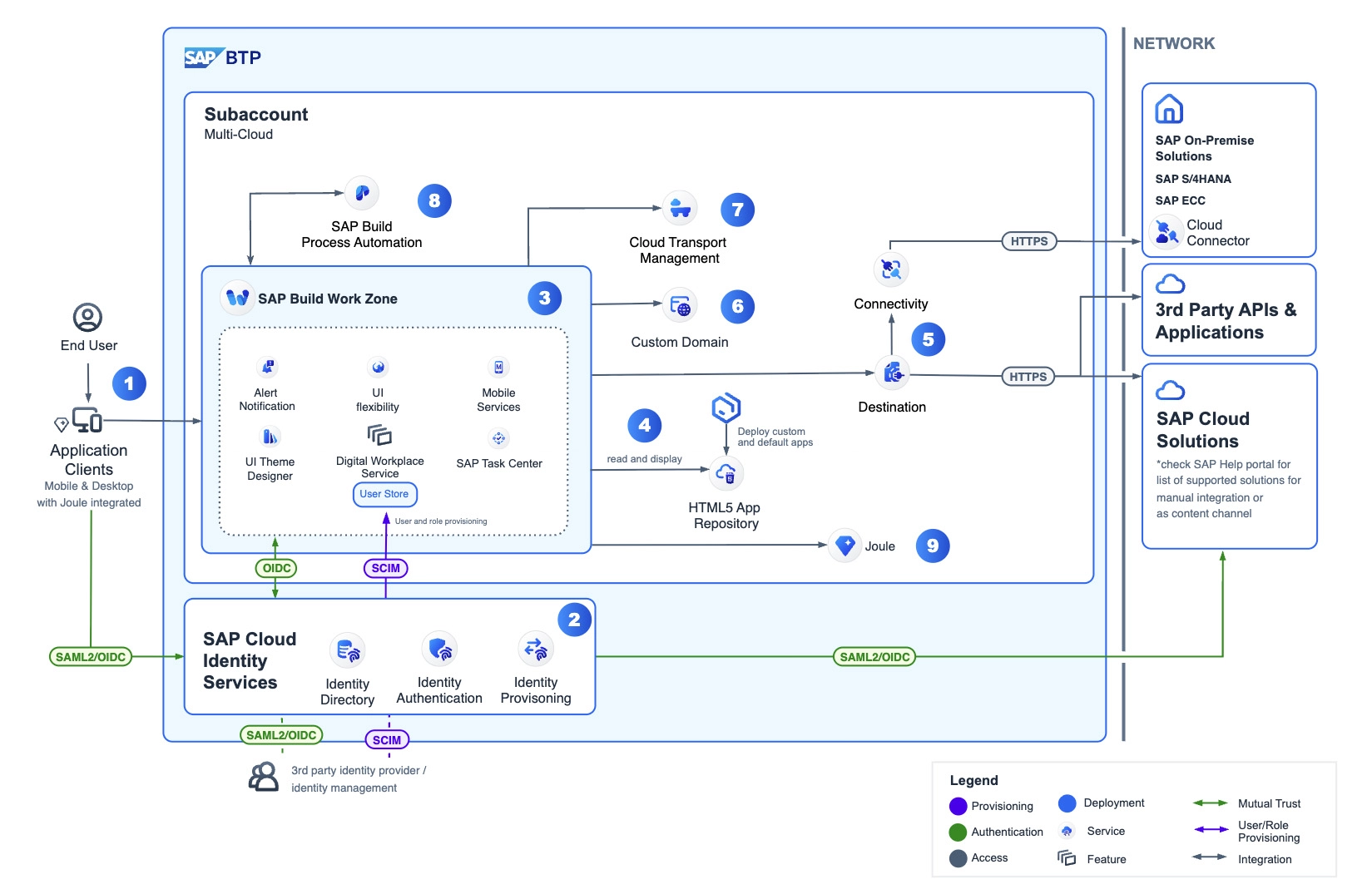
Figure 1: Technical Architecture of SAP Build Work Zone
The SAP Cloud Identity Services include the following services:
- Identity Authentication (IAS): Enables secure authentication and Single Sign-On for users in the cloud.
- Identity Provisioning (IPS): Provides functions for transporting identities and assigning roles and authorizations in connected cloud and on-premise systems. Integration of both SAP and non-SAP systems is supported through the standardized SCIM 2.0 protocol (SCIM = System for Cross-domain Identity Management).
- Identity Directory: The Identity Directory is the persistence layer of the SAP Cloud Identity Services. It is the central location where all identities — i.e., users and groups — are stored and managed. A SCIM 2.0 REST API allows SAP customers to define their own custom schemas with custom attributes. The Identity Directory also provides the so-called Global User ID, a unique identifier for users across the entire system landscape. The Global User ID is passed by the Identity Provisioning service to SAP cloud applications such as SAP Task Center, which require such a shared user identifier for their cross-system integration scenarios.
- Authorization Management: Authorizations in SAP systems allow users to access the applications and data relevant to their work. With this service, you can assign required technical roles, configure access to resources in SAP BTP-based applications, and make assignments to users, groups, or higher-level aggregate roles.
Integration of Applications and Processes
The primary task of a product that serves as a central entry point in the SAP environment is the integration and provision of applications and business processes. A fundamental technical prerequisite for integrating applications into a central environment such as SAP Build Work Zone is the implementation of Single Sign-On (SSO). SSO must work across all systems and application types involved, regardless of whether the application to be integrated is hosted on-premise or in the cloud, or whether it is an SAP or non-SAP application.
Single Sign-On / Single Logout
Single Sign-On (SSO) refers to an authentication procedure that allows users to log in only once at a central location — for example, with a username and password (or another form of authentication) — and then gain access to all connected applications without having to log in again. The counterpart to SSO is Single Logout (SLO), which ensures that a user is logged out of all connected applications when they log out at a central point. For SSO to work seamlessly across all connected systems and applications, the involved systems must use the same protocols and standards. In the SAP environment, SAML 2.0 (Security Assertion Markup Language) and OpenID Connect (OIDC) are the most commonly used standards for SSO and SLO.

Content Federation and Manual Integration
For integrating applications and content from existing SAP systems into SAP Build Work Zone, there are fundamentally two technical approaches (see Figure 2):
- Content Federation
- Manual Integration
Content Federation requires two steps: first, the application content (apps, groups, catalogs, and roles) must be exposed by the source system. For SAP systems that support Content Federation, this means activating the SAP Work Zone Configuration content provider in the source system. In a second step, the content exposed by the source system is then consumed in SAP Build Work Zone through a defined content provider configuration. Using Content Federation, both the application configuration and the assignment to business roles are managed by the source system and are automatically reflected in SAP Build Work Zone.

Figure 2: Options for Integrating Applications (= SAP Content)
With manual integration, administrators manage the application configuration exclusively on the SAP Build Work Zone side. Content to be integrated — such as apps, groups, catalogs, pages, and spaces — is added manually and assigned to the desired business roles within SAP Build Work Zone. This approach is primarily used for integrating non-SAP applications, for custom applications hosted on SAP BTP, and for any application types or source systems that do not support Content Federation.
Cloud Integration Automation
To simplify administration tasks, SAP has developed a new configuration process available for selected integration scenarios: the Cloud Integration Automation service is a highly efficient tool for administrators to connect SAP cloud solutions with SAP on-premise systems. It provides guided, step-by-step configuration procedures and automates integration steps wherever possible, significantly reducing manual effort and minimizing the risk of configuration errors. The service is available in the SAP BTP cockpit and can be used directly from there.
Extensibility and Customizations
The most commonly used method for extending SAP Build Work Zone with new functions and content is the design and development of custom UI Integration Cards. These are examined in the following section. In addition, there are further tools and options for extending and customizing SAP Build Work Zone: Content Packages, the UI Theme Designer, and Shell Plug-ins.
UI Integration Cards
UI Integration Cards are small, clear, and reusable containers that can be integrated at various points within the application environment or on pages in the latest generation of SAP products (e.g., SAP Build Work Zone, SAP SuccessFactors, or SAP S/4HANA). They display concise, role-specific information and actions from one or more data sources. Cards can be added to the pages of SAP Build Work Zone or displayed in so-called workspaces. Within SAP Build Work Zone, cards are managed and activated via the Content Manager in the administration console.
Further examples can be found in the SAP Card Explorer at this URL. SAP fundamentally distinguishes two types of cards: declarative cards and custom cards. Declarative cards are defined using a JSON manifest and require no separate programming. SAP provides a range of predefined card types that can be configured via the JSON manifest. The following card types are available:


For greater flexibility in card design and user interaction options, it is possible to develop UI Integration Cards individually and design the user interface entirely from scratch. Currently, the following three custom card types are available: Extension Cards (using SAPUI5), Custom HTML Cards (using standard web technologies such as HTML, CSS, and JavaScript), and Adaptive Cards (using the open-source Adaptive Cards framework from Microsoft).
Content Packages
Using so-called Content Packages, it is possible to extend SAP Build Work Zone with topic-specific content and functions. A Content Package is created in the SAP Business Application Studio as a ZIP file and includes a collection of specific SAP Build Work Zone elements and extensions, such as UI Integration Cards, workpages, and spaces. Content Packages can be distributed and imported into other SAP Build Work Zone instances. This makes it easy to share reusable content and extensions across different systems and tenants.
UI Theme Designer
Theming refers to the customization of the visual appearance or graphical presentation of the user interfaces of a website or SAP Build Work Zone web application. A theme is a group of design elements (such as layout, typography, color, icons, and buttons) used to define the look and feel of the user interface. The UI Theme Designer is a browser-based tool that allows you to create and adapt themes for SAP UI5 applications and SAP Build Work Zone. It is available as a service on SAP BTP and can be used directly from the SAP BTP cockpit. Custom themes created with the UI Theme Designer can be assigned to SAP Build Work Zone tenants via the administration console.
Shell Plug-ins
Shell Plug-ins make it possible to add custom buttons to the top menu bar (the so-called Shell) of SAP Build Work Zone, or to extend the user menu with additional entries (see Figure 3). Developers can create Shell Plug-ins in the form of freestyle UI5 applications using the SAP Business Application Studio and deploy them to the desired SAP BTP subaccount. SAP Build Work Zone administrators can then activate the desired Shell Plug-ins via the Content Manager in the administration console. The custom code in the Shell Plug-in is then automatically executed (once) the first time SAP Build Work Zone loads.

Figure 3: Extensions via Shell Plug-ins
Expertenwissen aus erster Hand:
„SAP Build“ von Rheinwerk
„SAP Build“ von Rheinwerk
The author of this blog post is also a co-author of the book "SAP Build" published by Rheinwerk Verlag. Get to know SAP Build in detail — from the fundamentals to practical applications. The book "SAP Build", co-authored by three experts from VANTAiO, was published in September 2024 by Rheinwerk Verlag and offers a comprehensive guide on how to profitably deploy SAP Build in your company on the basis of the SAP Business Technology Platform.


Markus Marenbach
Digital Workplace Expert
Do you have any question or request?
Are you interested in SAP BTP, SAP Build, the VANTAiO iNFOHUB or the topic of digital workplaces & digitalization with SAP in general?
Give us a call right away!
Tel.: +49 6131 622280
Or fill out the form below - we will get in touch with you as soon as possible.